
If you searched the Meta Quest store for The Midnight Walk and came up empty, you did nothing wrong. There is no standalone Quest version. You play it on Quest 3 the same way you play any other SteamVR title: by running the PC copy and using the headset as a PCVR display. The game’s Steam page lists “Quest via link” directly under supported headsets, so this is an officially documented path, not a workaround.
Table of Contents (10)
The short version
- No native Quest app. The Midnight Walk is sold on PC (Steam) and PS5, with VR support through PC VR (SteamVR) and PlayStation VR2. There is no standalone Quest, Quest 3, or Pico build.
- Quest 3 plays it as a PCVR headset. Buy the Steam version, connect Quest 3 to your PC over Meta Quest Link – a Link cable, Air Link, or the Steam Link app all work – and run it through SteamVR.
- It also runs flatscreen. One Steam purchase covers both modes; you are not buying a separate VR edition.
- Price: $29.99 / €29.99 on Steam (permanent price after the drop).
- Officially listed headsets: Valve Index, Rift, Rift S, and “Quest via link.”
Why there is no Quest 3 version to install
The Midnight Walk ships on two storefronts: Steam on PC and the PlayStation Store on PS5. On PS5 it supports PlayStation VR2; on PC it supports SteamVR-compatible headsets. Quest 3 is not a Steam headset on its own – it is a standalone device – so it has to borrow your PC’s GPU to run SteamVR games. That is what “Quest via link” on the Steam page means.
This is why two true statements can sound contradictory. People are absolutely finishing The Midnight Walk in full VR on Quest 3, and there is still no app to download from the Meta store. Both are correct because the headset is the display and the PC is doing the work.
How to play The Midnight Walk on Quest 3
You need four things working together, and none of them involve the Meta store:
- The PC version of The Midnight Walk from Steam.
- A Quest 3 (or Quest 2 / 3S) headset and Touch controllers.
- A PCVR connection to your PC – Link cable, Air Link, or the Steam Link app.
- SteamVR running, so the game opens in the headset instead of on a flat desktop window.
If you have played any SteamVR game on Quest 3 before, this is the exact same chain. The headset displays the VR build and tracks your room; the PC runs the game.
Step 1: Connect Quest 3 to your PC for PCVR
Use whichever PCVR connection you already trust. A Link cable is the most stable; Air Link is wireless over your local network; the Steam Link app on Quest 3 streams directly from SteamVR. Reviewers have completed the game on Quest 3 over both Steam Link and a wired Link cable, so all of these are proven to work.
For your first run, do not change three things at once. Pick the connection that is already reliable on your machine and leave it alone.

Step 2: Start SteamVR, then launch the game
With your headset connected and SteamVR running, launch The Midnight Walk from your Steam library. Because the Steam build supports both flatscreen and VR, the game routes to your headset when SteamVR is active. If you launch it with no headset connection up, it opens on your monitor in flatscreen mode – which is also a perfectly valid way to play, just not the one you want here.
Step 3: If it opens flat instead of in the headset
A desktop launch is not proof that Quest 3 is unsupported. It almost always means SteamVR was not running, or the headset was not connected, when the game started. Check that your Quest 3 PCVR session is live in SteamVR before launching, then start the game again.
What kind of VR game you are getting
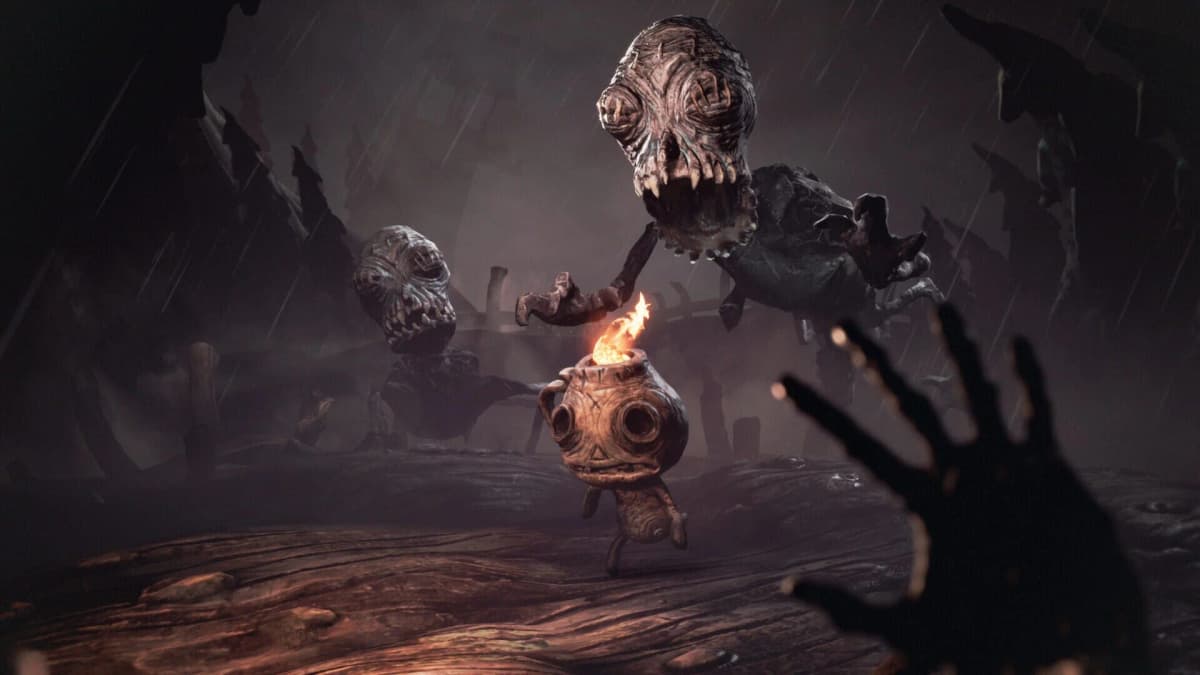
Set your expectations before you spend an hour tuning the connection. The Midnight Walk is a dark fantasy adventure where you play the Burnt One, traveling with a fire-bearing companion called Potboy toward Moon Mountain. It is built on light, stealth, environmental puzzles, and horror atmosphere – not fast combat. Its entire world was sculpted from more than 700 handmade clay models that were 3D-scanned and animated with a stop-motion look, which is exactly the kind of texture that benefits from a sharp VR display.
On Quest 3 that means image clarity and a stable connection matter more than reaction speed. You are optimizing so the handcrafted world reads cleanly and the tension lands, not for twitch reflexes. Most players finish the story in about four to six hours – see our How Long to Beat guide for a fuller breakdown.
Performance: judge the whole chain
Quest 3 streams the PC’s render output, so your experience depends on three layers, not just the headset:
- Your PC’s GPU running the SteamVR build of The Midnight Walk.
- SteamVR and the Meta Quest Link runtime.
- Your connection – a wired Link cable, Air Link, or Steam Link.
This is why one player’s “runs perfectly on Quest 3” and another’s “it only opens on my monitor” can both be honest. They are usually describing different connection states, not different games. Get a stable PCVR session first; refine your preferred connection method after the game is opening reliably in the headset.
Common Quest 3 mistakes to avoid
- Searching the Meta store for it. There is no native Quest version. Buy it on Steam and connect via Link.
- Launching before SteamVR is running. No live PCVR session means it opens flat on your monitor. Start SteamVR with your headset connected first.
- Assuming a flat launch means VR is broken. The game runs in both modes; a desktop window just means the headset chain was not active.
- Expecting an action shooter. This is a slow-burn horror-stealth-puzzle journey built around atmosphere and light. Judge your setup by clarity and stability, not combat.
- Buying it twice. One Steam purchase covers both flatscreen and VR – there is no separate VR SKU.
Practical takeaway
Quest 3 is a genuinely good way to experience The Midnight Walk – its handcrafted clay world and light-driven tension suit VR – but only if you treat it as PC VR. Buy the Steam version for $29.99, connect Quest 3 over Link, Air Link, or Steam Link, run it with SteamVR active, and you will be playing the full VR game. There is no Meta store download to wait for, because Quest 3 here is the headset, not the platform the game lives on. If you also have a PS5, the PS VR2 route is the other officially supported way in; our full VR platforms guide compares both.
FinalBoss // Gear
Level up your setup
01Meta Quest 3on Amazon→02PSVR2 accessorieson Amazon→03Gaming chairson Amazon→
Affiliate links · As an Amazon Associate, FinalBoss earns from qualifying purchases.
Want to Level Up Your Gaming?
Get access to exclusive strategies, hidden tips, and pro-level insights that we don't share publicly.
Ultimate Guide Strategy Guide + Weekly Pro Tips