
If your Crimson Desert map is filling up with locked Abyss rooms and you cannot tell which glowing object you are supposed to grab, the problem is almost always the same: you are trying to fight or brute-force a puzzle the game wants you to read. Abyss challenges are spatial logic tests built around state changes, and once you learn the loop, the early rooms stop being a wall.
Table of Contents (18)
The short version
- There are 40 Abyss Restoration puzzles in total, and clearing all of them unlocks the Conqueror of the Abysses trophy.
- Seven of those Abysses are completed on the main story path, so you finish them automatically as you progress — the remaining ones are optional cleanup.
- The first Abyss is the Axiom Archive in Chapter 1, and it teaches the core ability: Axiom Force.
- Axiom Force is a grab-and-manipulate ability: hold L3 (controller) or TAB (PC) to seize a glowing pillar or object and rotate or reposition it until the room changes state.
- Blue glow means active. Manipulate the blue interactable, watch for the glow to lock in or a Skybridge to appear, then cross — do not keep rotating after the room accepts the input.
How the Abyss system is laid out
Abyss challenges are a restoration system, not throwaway side content. There are 40 Abyss Restoration puzzles spread across the world, and finishing every one of them awards the Conqueror of the Abysses trophy. Seven of these are completed along the main story path, which matters for route planning: if an Abyss feels impossible because an ability or access point is missing, the issue is usually story progression, not your execution. Clear the story-bound ones as they come, then sweep the optional rooms later when your toolset is wider.
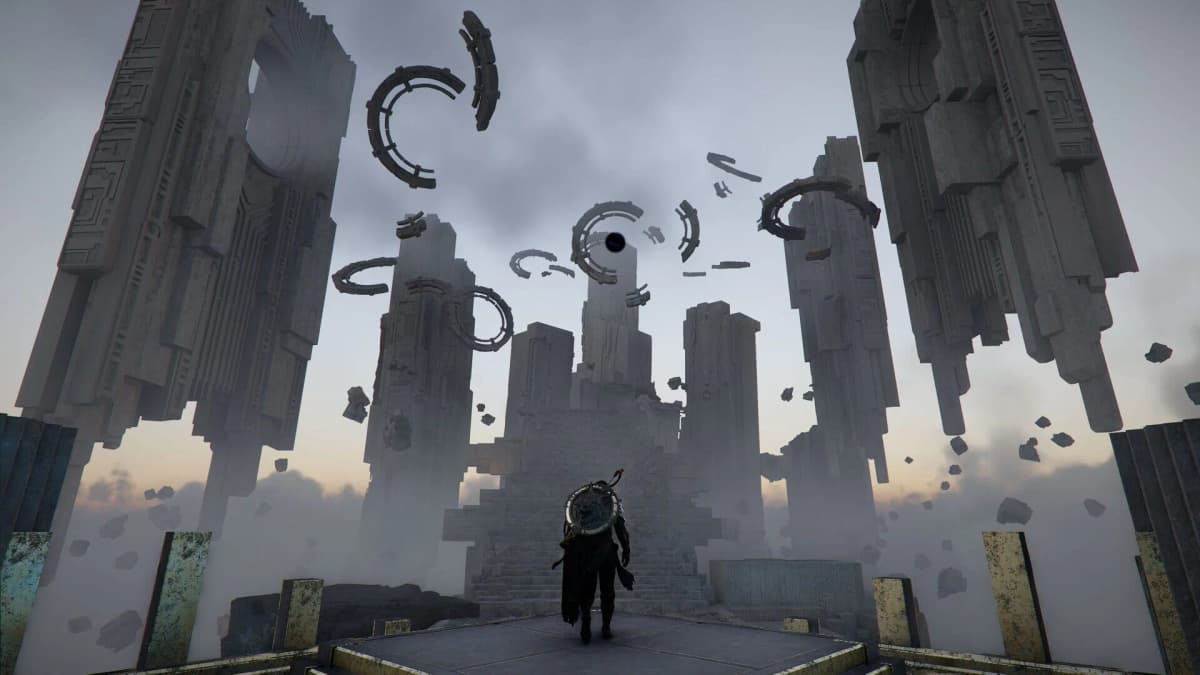
The first Abyss you reach is the Axiom Archive in Chapter 1, encountered during the Abyss Without Balance story mission. Treat it as the tutorial for the entire system. Everything you learn there — identify the blue interactable, grab it with Axiom Force, rotate it into the correct state, then use the resulting bridge or path — repeats across the rest of the Abysses.
Axiom Force: the ability that solves Abyss puzzles
Axiom Force is the grab-and-manipulate ability you use on nearly every Abyss puzzle. Hold L3 on a controller, or TAB on PC, to lock onto a puzzle object, then move or rotate it. In practice the valid targets are the blue-glowing pillars, alignment devices, and movable cores — not the obvious solid structures around them.
The most common mistake is grabbing the wrong piece of geometry. Players reach for the big square block when the real interactable is the glowing pillar or the circular corner piece attached to it. If an object does not respond to Axiom Force, do not keep mashing the input. Back up, rotate the camera, and look for the part of the mechanism with a blue light, a socket, or a distinct outline.
Rotating an object partway is also not enough. Most rooms want a completed state, not approximate alignment. Keep adjusting until you get clear confirmation — a brighter blue glow, a lock-in effect, or a bridge appearing. Stopping one step early is the number-one reason players assume a puzzle is bugged when it is not.
Skybridges and reading the room
Skybridges are the traversal gate inside many Abysses. The room is split, the path is missing, and you create the missing path by aligning an energy source — usually by grabbing a blue pillar with Axiom Force and turning it until the system registers the correct orientation. The moment the bridge appears, the room has accepted your input. Cross it instead of continuing to rotate the mechanism.
Color feedback carries the rules here. Crimson Desert does not always explain a puzzle in text; it shows you whether a state is inactive, active, or fully powered. A dull pillar means the room is still waiting for correct alignment. A bright blue glow or a new bridge means it is done. Verify the state changed before you commit — rushing across an incomplete bridge or before a second object is aligned just wastes the run.
On both PC and console the logic is identical; only the prompt differs. Use your Axiom Force input, manipulate the object deliberately, then stop and confirm the room reacted before moving on.
Power cores and sockets
Many later rooms add a movable power core or blue cube that you carry into a socket. Treat every core as an energy carrier with one job: unlock a bridge, energize a socket, or complete a central mechanism. The room decides the order — sometimes you align a pillar to build the route, then move the core across it; sometimes the core has to be seated before a bridge will activate.
A reliable way to read any room is to scan for its anchors in this order before you touch anything:
- Find the inactive bridge or blocked traversal point.
- Locate the blue-glowing pillar that could power it.
- Locate the movable core or cube.
- Locate the destination socket or central dial.
- Check whether reaching the socket depends on the bridge being built first.
Once you map those four or five anchors, the intended order usually becomes obvious without trial-and-error. For a worked example of this exact pattern, the dial-rotation room in the Grey Forest Ruins dial puzzle shows how a single central mechanism resolves once you align the surrounding pieces in the right order.
A note on Force Palm
Axiom Force and Force Palm are two different abilities — do not treat them as the same input. Axiom Force is the grab-and-manipulate tool covered above. Force Palm is a separate launch/activation strike with its own button. When a room calls for it, the prompt will tell you; until then, your default tool for moving and aligning puzzle objects is Axiom Force, not Force Palm.
Step-by-step approach for any Abyss room
1. Read the room before touching anything
Look for three anchors: a bridge gap, a blue interactable, and a socket or dial. If you grab the first object you see, you usually miss the route logic.
2. Grab the blue pillar or alignment device with Axiom Force
Hold L3 / TAB, then rotate until the glow intensifies or a Skybridge appears. A small movement is not success — wait for the room to confirm the alignment.
3. Cross only after the bridge is live
Some rooms open the full route at once; others only expose part of it. Check where the bridge leads and whether there is a second mechanism on the far side before you carry a core into a dead end.
4. Move the power core once the route exists
In most rooms the bridge exists to let you transport the core to its socket. Dragging the core around before the route is ready just creates backtracking — build the path first unless the core itself is what reveals the route.
Common mistakes
- Grabbing the wrong object: target the blue pillar, the circular corner piece, or the core — not the most visible chunk of scenery.
- Stopping rotation too early: wait for the lock-in glow or bridge, not approximate alignment.
- Confusing Axiom Force with Force Palm: Axiom Force (hold L3 / TAB) grabs and manipulates; Force Palm is a separate ability with its own prompt.
- Ignoring story gating: seven Abysses are tied to the main story, so a “stuck” Abyss is often a progression issue, not an execution one.
- Solving outward from the nearest object: read the whole room first, especially the bridge gap and the final socket.
Route planning for completionists
Chasing all 40 Abysses for the Conqueror of the Abysses trophy is easier as a back-end sweep than a front-loaded grind. Seven Abysses are completed during the main story, so finish those as they appear, mark unclear optional ones on your map, and return when you have wider access. Linked Abysses also feed into each other — for chained rooms see the Tomb of Perdition walkthrough and the timed glide sequence in the Crossroads of Uncertainty guide, both of which reuse the Axiom Force loop you learned in the Axiom Archive.
Practical takeaway
Reduce every Abyss room to a sequence: read the room for its bridge gap, blue interactable, and socket; grab the blue pillar with Axiom Force (hold L3 / TAB) and rotate until the state locks in; confirm the Skybridge before you cross; then move the power core into its socket. Learn this once in the Axiom Archive in Chapter 1 and it carries through all 40 Abysses. Knock out the seven story-bound ones as you go, leave the stubborn optional rooms for a later pass, and you avoid the only real time sink: brute-forcing a puzzle the game built you to read.
FinalBoss // Gear
Level up your setup
01Top-rated gaming headsetson Amazon→02High-refresh gaming monitorson Amazon→03Gaming chairson Amazon→04Discounted game keyson Kinguin→
Affiliate links · As an Amazon Associate, FinalBoss earns from qualifying purchases.
Want to Level Up Your Gaming?
Get access to exclusive strategies, hidden tips, and pro-level insights that we don't share publicly.
Ultimate Guide Strategy Guide + Weekly Pro Tips